
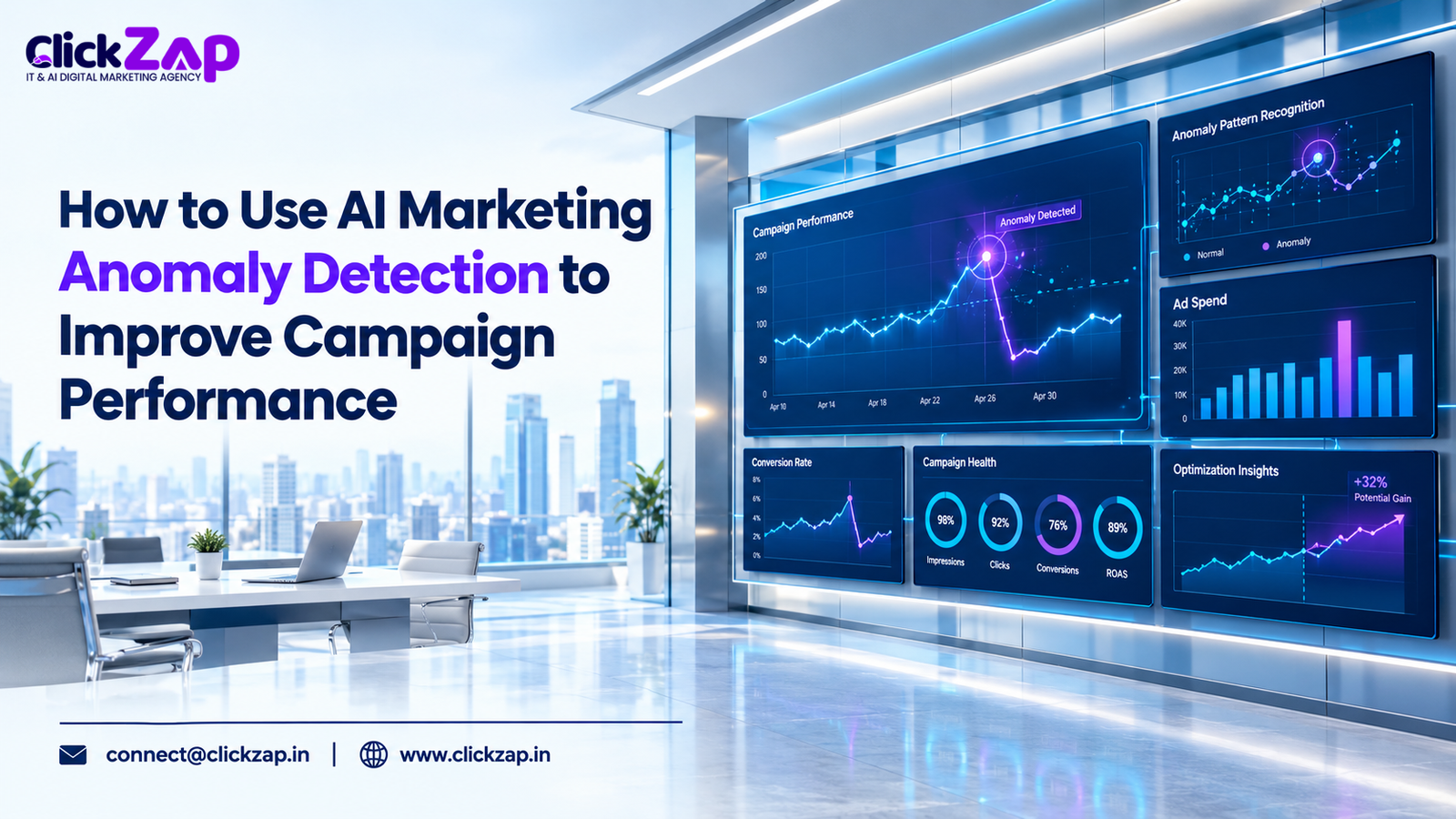
Traffic dips on a Tuesday, and spend jumps by mid afternoon, and a broken form quietly halves your leads. Most teams find out days later, when a client asks why the numbers look wrong. AI marketing anomaly detection catches these problems the day they start.
That delay is expensive, and it is avoidable. AI marketing anomaly detection uses machine learning to learn what “normal” looks like for your marketing metrics, then flags data points that fall outside that normal range so you can investigate them quickly. It does not fix problems for you. It tells you where to look first.
This guide explains how anomaly detection works, which problems it catches, which tools offer what, and how to set it up without drowning in false alarms. You will also see four illustrative scenarios and a practical rollout plan.
What Is AI Marketing Anomaly Detection?
AI marketing anomaly detection is the practice of using statistical models and machine learning to spot unusual patterns in marketing data, such as traffic, spend, clicks, conversions and cost per acquisition, and to alert you when something departs from expected behavior.
- Anomaly: a data point that doesn’t fit the pattern around it. A conversion count of 4 on a day that normally produces 40 is an anomaly.
- Baseline: the expected range for a metric, built from historical data. Think of it as “what normal looks like.”
- Statistical deviation: how far a data point sits from the baseline, measured against how much that metric normally varies.
- Seasonality: repeating patterns tied to time, such as weekday versus weekend behavior, month end spikes or festival season demand.
- False positive: an alert for something that turned out to be normal. Too many of these and people stop reading alerts.
- Root cause analysis: the work of finding why an anomaly happened, not just that it happened.
- Correlation vs. causation: two metrics moving together doesn’t mean one caused the other. A traffic drop and a site update on the same day are correlated. Only investigation shows whether the update caused it.
How AI and machine learning find unusual patterns
Machine learning models study your history, including trends, weekly cycles and past spikes, and forecast an expected range for each new data point. When the actual value lands well outside that range, the system flags it. Some approaches model a single metric over time. Others compare many dimensions at once, such as campaign, device and location.
Routine fluctuation vs. meaningful anomaly
Not every dip matters. A Sunday traffic drop for a B2B site is routine. A Tuesday drop of the same size is not. A good system accounts for these rhythms. A weak one treats every wobble as a crisis.
Here is the rule of thumb: a fluctuation becomes an anomaly when it breaks a pattern the data has established, and it becomes meaningful when it affects a metric tied to leads, revenue or spend.
Why Is AI Marketing Anomaly Detection Important?

Manual monitoring doesn’t scale. Nobody can check every campaign, device segment and conversion event every day. Anomaly detection earns its place in five ways:
- Early problem detection. You see a drop in the same hours or days it starts, not at the end of month report.
- Less wasted ad spend. A broken landing page or runaway budget costs money every hour it goes unnoticed.
- Fewer missed conversions. If a form or checkout breaks, every hour of delay is lost leads.
- Faster tracking problem discovery. Many “performance drops” are measurement failures, not real declines. Catching them protects your reporting.
- Better decisions. When your data is monitored, you act on facts instead of hunches.
One caution up front: an alert is a prompt to investigate, not a verdict. We’ll come back to that.
Common Marketing Performance Anomalies AI Can Detect
Each anomaly below comes with likely causes and investigation steps. These are possibilities to check, not a diagnosis.
Sudden drops in website traffic
Possible causes: a tracking tag broken by a site update, a robots.txt or no index mistake, a ranking change, a paused campaign, a server outage, or a seasonal dip.
Investigate:
- Check whether the drop appears in more than one source. If GA4 shows it but server logs don’t, suspect tracking.
- Segment by channel (organic, paid, direct, referral) to isolate where it happened.
- Review Google Search Console for indexing or crawl issues.
- Check your change log for recent site or tag updates.
Unexpected conversion rate changes
Possible causes: a broken form, a changed checkout flow, a landing page edit, traffic quality shifting after a targeting change, or a tracking fault.
Investigate: Compare conversion rate by device, browser and landing page. Test the form yourself on mobile and desktop. Check whether traffic volume or source mix changed at the same moment.
Abnormal advertising spend
Possible causes: a budget edit, a bid strategy change, a new campaign going live, competitor pressure in the auction, or broader match types capturing more queries.
Investigate: Open the change history in Google Ads. Compare spend by campaign and by day. Check search terms for irrelevant traffic.
Unexpected increases in CPC or CPA
Possible causes: more competition, lower quality scores, landing page problems, audience changes, or conversions being under reported, which inflates CPA artificially.
Investigate: Look at auction level and impression share data. Compare landing page performance. Confirm that conversions are recording correctly before blaming the campaign.
Unusual click through rate changes
Possible causes: a new ad copy variant, a changed search term mix, a competitor appearing, or an ad disapproval that shifts delivery. A sudden CTR spike can also signal invalid or bot traffic.
Investigate: Compare CTR by ad, query and device. Check ad status for disapprovals. If clicks rose but conversions didn’t, review traffic quality.
Conversion tracking errors
Possible causes: a removed or misfiring tag, a changed button ID, consent banner changes affecting measurement, or a duplicated event.
Investigate: Use tag debugging tools to confirm events fire once, at the right time. Compare ad platform conversions against your CRM or form submissions. If the numbers diverge, the tracking is suspect.
Campaign performance fluctuations
Possible causes: learning phases after a bid or budget change, audience fatigue, weekday patterns, or an external event.
Investigate: Separate noise from trend. Compare against the same weekday in previous weeks, not just yesterday. Wait for enough data before concluding anything has changed.
How Does Anomaly Detection Work, Step by Step?
Behind the dashboards, the process follows eight stages:
- Collect data. Pull metrics from analytics, ad platforms and your CRM into one place or onto one dashboard.
- Establish historical baselines. The model learns typical values and cycles from past data.
- Identify unusual patterns. New data points are scored against the model.
- Compare against expected ranges. The system forecasts a range and checks whether reality falls inside it.
- Generate automated alerts. Anything outside the range triggers an email, chat message or dashboard flag.
- Investigate the root cause. A person works out why it happened.
- Take corrective action. Fix the tag, adjust the bid, pause the campaign or update the page.
- Monitor the results. Confirm the metric returns to its expected range.
Where each component fits
Machine learning is the engine that learns patterns from your history, including trends, weekly cycles and variability, without you hand writing every rule. Predictive analytics uses those learned patterns to forecast what a metric should do next, which is what makes “expected range” possible. Human review is where meaning gets assigned. Software can tell you a number is odd. It cannot tell you whether the cause is a competitor, a festival or a broken form. That takes someone who knows the business.
How to Use AI Marketing Anomaly Detection Step by Step

Here is a practical rollout you can start this week.
- Define KPIs and goals. Pick three to five metrics tied to business outcomes, such as qualified leads, cost per lead, ad spend and conversion rate. Fewer, better metrics beat a wall of charts.
- Connect reliable data sources. Link GA4, Google Ads and, if relevant, your CRM. Anomaly detection amplifies whatever data quality you already have, good or bad.
- Choose suitable tools. Match the tool to your team’s skills and budget. Start with what you already have.
- Establish baselines. Give the system enough history to learn weekly patterns. Seasonal businesses need longer windows that cover their cycles.
- Configure thresholds and rules. Where tools allow, set sensitivity and alert conditions. Begin conservative. You can tighten later.
- Segment by channel, campaign, device and audience. A flat total can hide a collapsing segment. Mobile conversions may drop while desktop rises, and the combined number looks fine.
- Investigate before changing anything. Resist the urge to edit campaigns the moment an alert fires. Confirm the data is real first.
- Record findings and refine. Keep a simple log: what fired, what it was, what you did. Over time this shows which alerts matter and which to retire.
A practical example (illustrative)
This is a hypothetical example for explanation, not a client result.
A Hyderabad services business runs Google Ads and tracks form submissions as conversions in GA4. They choose four KPIs: daily spend, clicks, form submissions and cost per lead. They configure alerts on spend and form submissions.
One morning, an alert shows form submissions well below the expected range while clicks and spend look normal. Instead of cutting the budget, the marketer tests the form on a phone. The submit button fails after a plugin update. They roll back the plugin, run a test submission, and watch the next day’s data return to range. The anomaly pointed to a technical fault, not a campaign problem. Pausing the ads would have solved nothing.
Best Marketing Anomaly Detection Tools
Tools differ a lot here. Some platforms have native anomaly features. Others are reporting layers, and some require you to build the detection yourself. Don’t assume any platform offers dedicated AI anomaly detection without checking its current documentation. Features change.
|
Tool |
Type |
Anomaly capability |
Setup needed |
|
Google Analytics 4 |
Native platform feature |
Automated insights; custom insights with a “Has anomaly” condition |
Low: configure in Insights |
|
Google Ads |
Native, rule based |
Automated rules that notify on conditions you define |
Low to medium: you set the thresholds |
|
Google Search Console |
Data source |
No dedicated anomaly feature we could verify |
Manual review or export |
|
Looker Studio |
Reporting layer |
Visualization; no dedicated anomaly feature we could verify |
Build dashboards and add logic elsewhere |
|
Microsoft Power BI |
Native visual feature |
Anomaly detection on line charts with time series data |
Medium: model your data first |
|
Tableau |
Native (Tableau Cloud) |
Tableau Pulse flags unexpected values on metrics |
Medium: needs Pulse on Tableau Cloud |
|
Google Big Query |
Cloud data warehouse with ML |
Big Query ML anomaly detection functions |
High: SQL and data skills |
|
Custom AI/ML workflow |
Custom build |
Whatever you design |
High: data science resources |
Google Analytics 4 (GA4)
Google Analytics 4 is Google’s analytics platform for websites and apps. Its Analytics Intelligence feature uses machine learning to detect unusual changes in your data and surface them as insights, and you can create custom insights that alert you when a metric has an anomaly. Strengths: built in, free, no integration needed. Limitations: it sees only what GA4 collects, so it won’t see ad spend unless data is linked, and you get limited control over detection sensitivity. It is only as good as your tracking.
Google Ads
Google Ads is Google’s advertising platform. It offers automated rules that can email you when conditions you define are met, such as CPA above a figure or spend above a limit. Strengths: native, fast to configure, close to the spend. Limitations: these are threshold rules, not machine learning anomaly detection. They don’t learn your seasonality. Confirm current capabilities in Google Ads Help, because features evolve.
Google Search Console
Google Search Console reports how your site performs in Google Search, including clicks, impressions and indexing issues. It is invaluable for diagnosing organic traffic drops. Limitation: we could not confirm a dedicated anomaly detection feature for performance data, so treat it as an investigation source. Export its data to Big Query or compare it against alerts from other tools.
Google Looker Studio
Looker Studio is a free dashboarding tool that connects to GA4, Google Ads, Search Console and more. Strengths: a single view of all channels, easy sharing with clients. Limitation: it is primarily a visualization layer. Pair it with an alerting method rather than assuming it detects anomalies by itself.
Microsoft Power BI
Power BI is Microsoft’s business analytics platform. Its anomaly detection feature works on line charts with time series data. It marks anomalies, shows an expected range and can suggest possible explanations. Limitations: it is restricted to certain visual types, and your data must be well modeled first. Review Microsoft’s documentation for the current constraints.
Tableau
Tableau is a data visualization and analytics platform. Tableau Pulse, available on Tableau Cloud, can surface insights such as unexpected values for metrics you follow, with an expected range shown on the chart. Limitation: it isn’t available on every Tableau deployment, and it needs metric definitions set up.
Google Big Query
Big Query is Google’s cloud data warehouse, and GA4 can export raw event data into it. Big Query ML lets you build models and run anomaly detection functions, including time series approaches, with SQL. Strengths: full control, handles large volumes, supports multi dimensional analysis. Limitations: it needs SQL skills and setup effort, and it incurs cloud costs.
Custom AI/ML workflows
Teams with data science support can build detection in Python or similar tools: pull data, train a model, schedule it, push alerts to chat or email. Strengths: total flexibility. Limitations: maintenance, monitoring of the model itself, and the risk of building something nobody trusts.
A pragmatic path: start with native alerts in GA4 and Google Ads. Add a dashboard layer. Move to Big Query or custom models only when native tools stop answering your questions.
Best AI Digital Marketing Agency in Hyderabad
Real World Examples of AI Marketing Anomaly Detection
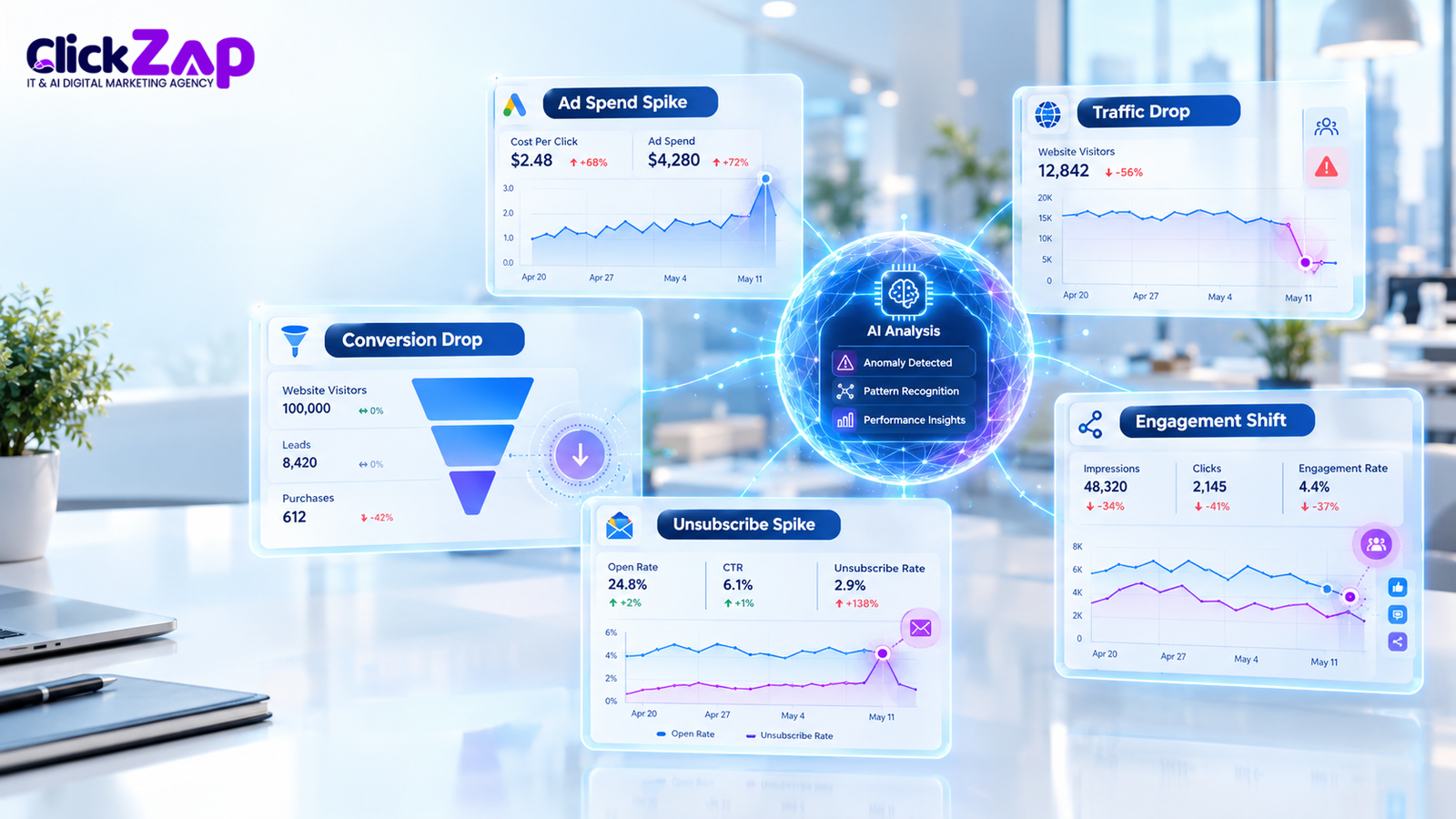
All four scenarios are hypothetical illustrations, not ClickZap IT client results.
Scenario 1: Website traffic drops unexpectedly
- What it looks like: organic sessions fall sharply on a weekday that normally performs well.
- How AI could flag it: the model’s expected range for that weekday is breached, and a GA4 custom insight fires.
- What to investigate: Search Console for indexing issues, recent site releases, robots.txt, redirects and analytics tag status.
- Corrective action: fix whatever was broken, such as restoring a no index blocked page or a broken tag.
- Verify resolution: confirm sessions return to the expected range over several days and that Search Console crawl data looks normal.
Scenario 2: Google Ads spend rises while conversions fall
- What it looks like: daily spend climbs while conversions stay flat or decline.
- How AI could flag it: a spend anomaly and a cost per conversion anomaly appear together.
- What to investigate: the change history, bid strategy, search terms report, location and device splits, and whether conversion tracking still works.
- Corrective action: add negative keywords, tighten targeting or revert a harmful change. Don’t cut the budget until you know the cause.
- Verify resolution: watch spend efficiency and conversion volume over a full cycle. Don’t judge from a single day.
Scenario 3: Conversion tracking suddenly reports fewer leads
- What it looks like: form conversions in GA4 fall, but sales say enquiries are steady.
- How AI could flag it: the conversion count breaks its baseline while clicks and sessions stay normal.
- What to investigate: tag firing, event names, consent settings, and a comparison against CRM records.
- Corrective action: repair the tag or event configuration, then document the fix and the date.
- Verify resolution: reconcile platform conversions with CRM lead counts for the same period.
Scenario 4: One campaign’s CPA spikes
- What it looks like: a single campaign’s cost per acquisition jumps while others are stable.
- How AI could flag it: segment level detection catches what the account level average hides.
- What to investigate: recent edits to that campaign, its landing page, audience overlap and competitor activity.
- Corrective action: reverse the harmful change or fix the page. If nothing changes, review the audience and be creative.
- Verify resolution: monitor CPA against its baseline and confirm enough conversions have accumulated to trust the reading.
Best Practices for Automated Marketing Anomaly Detection
- Monitor meaningful KPIs. Leads, qualified pipeline, cost per lead and spend beat vanity metrics.
- Account for seasonality and weekday patterns. Compare like with like, such as Tuesday against previous Tuesdays.
- Avoid alert fatigue. Too many alerts train people to ignore all of them. Fewer, sharper alerts get action.
- Check data quality first. Audit tags, events and naming before trusting any model.
- Review campaign changes. Keep a change log so you can match anomalies to edits.
- Validate conversion tracking regularly. Test forms and checkout flows on a schedule, not only when something breaks.
- Combine AI with human expertise. Models flag, people judge.
- Protect customer data. Limit who can see raw data, follow your privacy obligations, and be careful when exporting data to third party tools.
- Review alert accuracy regularly. Count false positives and missed events, and tune accordingly.
Common Mistakes to Avoid
- Treating every fluctuation as serious. Normal variation is normal.
- Working with incomplete or inaccurate data. Garbage in, confident looking garbage out.
- Ignoring seasonality. A festival week surge isn’t a crisis. A model unaware of it will say otherwise.
- Changing campaigns before investigating. You may fix the wrong thing and lose useful learning.
- Relying entirely on automated alerts. Silence from an alert system is not proof that everything is fine.
- Ignoring attribution and tracking issues. Different platforms attribute conversions differently, so mismatched numbers don’t always mean something is broken.
- Tracking too many metrics. Prioritize. Ten critical alerts beat a hundred ignored ones.
How Anomaly Detection Supports Better Campaign Performance
Anomaly detection doesn’t improve performance by itself. It shortens the gap between something going wrong and someone noticing. That gap is where money and leads leak.
- Budget decisions: faster visibility into abnormal spend helps you protect the budget before it’s gone.
- Reporting reliability: catching tracking faults early keeps reports defensible. That matters when you present results to clients or leadership.
- Consistent monitoring: automated checks run daily, which suits small teams that can’t watch dashboards constantly.
- Faster investigation: an alert narrows the search to a metric, a segment and a time window.
No tool guarantees better results. What it gives you is earlier, better informed decisions. Use it alongside solid campaign fundamentals, such as the practices in our guide to detecting wasted ad spend in PPC campaigns.
Frequently Asked Questions
What is AI marketing anomaly detection?
It is the use of machine learning to learn the normal pattern of your marketing metrics and flag unusual changes. For example, it can alert you when daily leads fall far below their usual weekday range. It points you to a problem. A person still has to work out the cause.
How can AI detect unusual changes in marketing campaign performance?
AI builds an expected range from historical data, including weekly cycles and trends. When a metric such as spend, clicks or conversions falls outside that range, the system flags it. Segmenting by campaign, device or channel helps it isolate where the change happened.
What tools can detect marketing performance anomalies?
Options include GA4 insights, Google Ads automated rules, Power BI anomaly detection, Tableau Pulse, Big Query ML and custom models. Each works differently, and not all use machine learning. Check each platform’s current documentation, then match the tool to your team’s skills and data setup.
How does machine learning identify marketing data anomalies?
Models learn patterns from past data and forecast what a metric should do next. They compare actual results to that forecast. If the gap exceeds what normal variation explains, the point is marked as an anomaly. Different models suit different data, such as time series or multi metric comparisons.
How can AI detect sudden drops in website traffic or conversions?
It compares each day’s traffic or conversions against the expected range for that day. A sharp, unexplained fall triggers an alert. Say sessions normally reach a certain level on weekdays and suddenly don’t: the alert prompts you to check tracking, indexing and recent site changes.
How can marketers use AI alerts to improve campaign performance?
Treat alerts as starting points. Verify the data, find the root cause, fix it, then monitor whether the metric recovers. Log each case. Over time, you learn which alerts matter and can tune thresholds so your team acts on fewer, better signals.
Conclusion
AI marketing anomaly detection works best as a partnership. Reliable data gives the models something trustworthy to learn from. Well tuned monitoring surfaces the right signals. Human investigation turns those signals into correct decisions.
You don’t need a data science team to begin. Pick three to five KPIs that matter, switch on the native alerts you already have in GA4 and Google Ads, and review what fires for a few weeks. Then tune, segment and expand. Teams that start small and stay disciplined tend to get more from monitoring than teams that deploy everything at once.
Want to make your marketing campaigns easier to monitor and optimize? Get in touch with the ClickZap IT team to explore data driven digital marketing solutions for your business.
Also Read: AI Powered Marketing Reporting: How to Turn Campaign Data Into Actionable Insights

0 Comments