
Google Business Profile Update
For local businesses, appearing in local search results is one of the most powerful ways to attract customers. When people search for services “near me,” the results they see on Google often include business listings from Google Business Profile that appear directly in Google Search and Google Maps.
Because of this, every Google Business Profile Update introduced by Google can significantly affect how local businesses appear online. These updates influence how businesses manage their listings, interact with customers, and improve their visibility in local search results.
Over the last few years, Google has introduced several new features and improvements designed to help businesses connect with customers more easily. From profile editing directly in search results to enhanced analytics and improved messaging features, the Google Business Profile Update continues to reshape how local SEO works.
For small businesses, startups, and marketers, staying updated with the latest Google Business Profile Update is essential. Optimizing your profile according to the latest Google Business Profile changes 2026 can improve your local search rankings, attract more customers, and strengthen your brand presence.
In this guide, we will explain everything you need to know about the latest Google Business Profile Update, how it impacts your business, and how you can optimize your listing for better visibility and higher rankings.
At ClickZap IT, we help businesses implement powerful local SEO strategies and optimize their business listings to maximize local search visibility.
What is Google Business Profile and Why It Matters for Local Businesses
A Google Business Profile (GBP) is a free tool that allows businesses to manage their online presence across Google platforms, including Google Search and Google Maps.
Your business profile displays essential information such as:
- Business name
- Address and location
- Phone number
- Website link
- Business hours
- Reviews and ratings
- Photos and updates
When customers search for services like “digital marketing agency near me” or “restaurant near me,” Google often shows a Local Pack a set of business listings pulled from Google Business Profiles.
This makes google business profile optimization a critical part of any local SEO strategy.
Why Google Business Profile is Important
Here are some major benefits:
1. Improves Local Search Visibility
Optimized profiles help businesses appear in Google Maps and local search results.
2.Builds Trust Through Reviews
Customer reviews influence buying decisions and increase credibility.
3.Drives Website Traffic and Calls
Customers can directly call, visit your website, or get directions from your profile.
4.Supports Local Business Marketing
GBP acts as a mini-website showcasing your brand to local customers.
5.Boosts Local Search Rankings
A well-optimized profile can significantly improve local search ranking factors.
For businesses working with agencies like ClickZap IT, a properly optimized business profile becomes one of the most powerful tools for attracting local customers.
Latest Google Business Profile Updates (What Changed Recently)
Google constantly updates its business profile features to improve user experience and help businesses engage better with customers.
Let’s look at the most important google business profile latest update features.
1. Editing Business Profiles Directly in Google Search
One of the biggest google business profile changes 2026 is the ability to manage your profile directly from Google Search.
Instead of logging into a separate dashboard, businesses can now:
- Edit business details
- Upload photos
- Create posts
- View insights
This makes business profile management faster and easier.
2. Improved Messaging Features
Businesses can now communicate with customers directly through their profile.
Customers can:
- Ask questions
- Request information
- Contact businesses instantly
This helps improve customer engagement and response time.
3. Enhanced Performance Insights
Google now provides more detailed insights into how customers interact with your listing.
Businesses can track:
- Search queries
- Calls from listings
- Direction requests
- Website clicks
These insights can also be integrated with tools like Google Analytics.
4. New Photo and Video Capabilities
Businesses can now upload:
- Short videos
- Product images
- Interior and exterior photos
Listings with images receive significantly more engagement.
5. Product and Service Listings
Businesses can showcase products and services directly within their profile.
This feature is especially useful for:
- Retail businesses
- E-commerce stores
- Local service providers
Integration with Google Merchant Center allows product visibility across Google platforms.
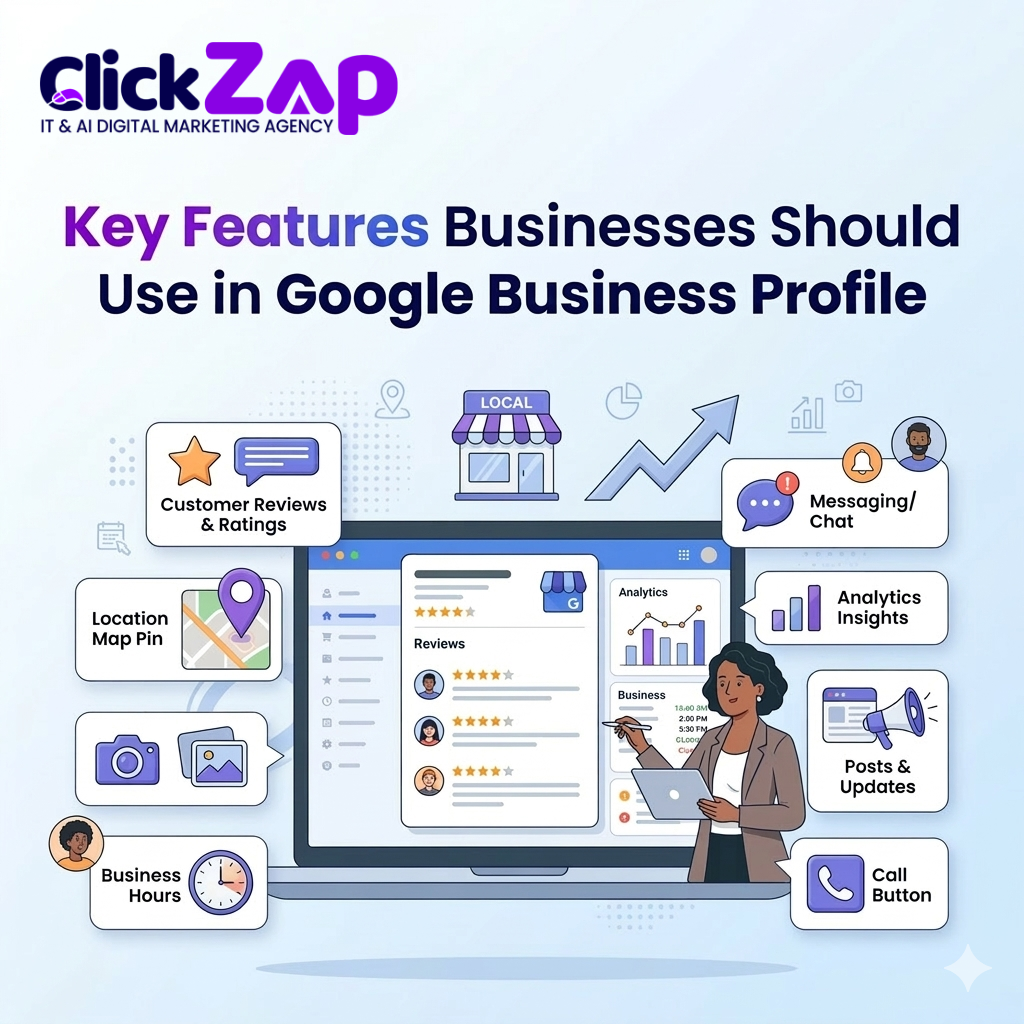
Key Features Businesses Should Use in Google Business Profile
To take full advantage of the latest google business profile new features, businesses should actively use the following tools.
Business Information Management
Make sure your business details are accurate:
- Business name
- Address
- Phone number
- Website
- Business hours
Consistency across online business listings is essential for location based SEO.
Customer Reviews
Reviews are one of the most powerful google business profile ranking factors.
Encourage customers to:
- Leave reviews
- Share their experiences
- Upload photos
Always respond to reviews to build trust and engagement.
Google Posts
Businesses can publish posts about:
- Promotions
- Events
- Announcements
- Offers
These posts appear directly in your business profile.
Questions and Answers Section
Customers often ask questions before choosing a business.
By actively managing the Q&A section, businesses can:
- Provide quick answers
- Address concerns
- Improve user experience
Photo and Video Uploads
Businesses should regularly upload:
- Team photos
- Office images
- Product pictures
- Customer experience photos
Visual content improves engagement and credibility.
How to Optimize Your Google Business Profile After the Latest Updates
Optimizing your listing after a google business profile update is essential for improving your local search performance.
Here is a step-by-step google business profile optimization guide.
Step 1: Complete Your Business Profile
Fill out every available field in your profile.
Include:
- Business category
- Services
- Products
- Attributes
- Description
A complete profile helps improve local search optimization.
Step 2: Use Relevant Keywords
Include keywords naturally in:
- Business description
- Services section
- Posts
For example:
- google business profile optimization
- local search optimization
- google business profile seo
This helps Google understand your business better.
Step 3: Add High Quality Photos
Profiles with photos receive:
- More clicks
- More direction requests
- Higher engagement
Upload photos regularly to keep your profile active.
Step 4: Encourage Customer Reviews
Reviews are critical for Google Maps ranking tips.
Best practices:
- Ask satisfied customers for reviews
- Provide a review link
- Respond professionally to feedback
Step 5: Publish Weekly Posts
Regular updates signal to Google that your business is active.
Share:
- Offers
- Tips
- News
- Blog updates
Step 6: Monitor Performance
Track performance using insights from:
- Google Business Profile dashboard
- Google Analytics
This helps measure customer interactions and optimize your strategy.
Common Mistakes Businesses Make With Google Business Profile
Many businesses lose ranking opportunities due to simple mistakes.
Here are common problems to avoid.
Incomplete Profiles
Missing information reduces visibility and credibility.
Inconsistent Contact Information
Your business name, address, and phone number should match across all platforms.
Ignoring Reviews
Unanswered reviews can damage customer trust.
Low Quality Images
Blurry or outdated images reduce engagement.
Keyword Stuffing
Overusing keywords in descriptions may harm your ranking.
Best Practices to Rank Higher on Google Maps and Local Search
Ranking higher in Google Maps requires a combination of optimization and engagement.
Here are the best strategies.
Maintain Consistent Business Information
Ensure consistent details across all online business listings.
Build High Quality Reviews
Reviews significantly impact local search ranking factors.
Use Local Keywords
Include location based keywords in your profile.
Add Services and Products
Detailed listings help Google understand your business offerings.
Get Local Backlinks
Links from local websites strengthen your local SEO strategy.
Keep Your Profile Active
Regular updates signal credibility and improve rankings.
At ClickZap IT, we specialize in helping businesses implement advanced google business profile seo strategies that drive local traffic and improve rankings.
Conclusion
Keeping up with every google business profile update is essential for businesses that want to stay competitive in local search results.
Google continues to improve its business listing platform with new tools and features designed to enhance customer engagement and improve local search visibility.
By understanding the google business profile latest update, optimizing your listing, and following proven local search optimization strategies, businesses can significantly improve their visibility on Google Search and Google Maps.
For businesses that want expert help with google business profile optimization, local SEO strategy, and digital marketing growth, ClickZap IT provides comprehensive solutions designed to boost local rankings and attract more customers.
Also Read: Digital Marketing Agency for Small Businesses: The Complete Growth Guide (2026)
Frequently Asked Questions (FAQs)
1. What is the latest Google Business Profile update?
The latest google business profile update includes profile editing directly in Google Search, improved messaging, enhanced insights, and better product listing features.
2. How often should I update my Google Business Profile?
Businesses should update their profile regularly by posting updates, adding photos, responding to reviews, and keeping business information accurate.
3. How do I optimize my Google Business Profile for local SEO?
You can optimize your listing by completing your profile, adding keywords, uploading photos, collecting reviews, and maintaining consistent business information.
4. Why is Google Business Profile important for local SEO?
A well-optimized profile improves visibility in Google Maps and local search results, helping businesses attract nearby customers.
5. What factors affect Google Business Profile rankings?
Important google business profile ranking factors include reviews, profile completeness, keyword relevance, location proximity, and regular activity.



0 Comments