
AI Powered Website Performance Optimization
In 2026, a slow website isn’t just an inconvenience; it’s a direct hit to revenue. Google’s algorithms, users’ patience, and even AI search engines now treat speed as a proxy for quality. If your pages take too long to load, respond sluggishly to taps, or jump around while loading, visitors bounce, rankings slip, and conversions drop before your value proposition ever gets a chance to land. This is exactly why AI powered website performance optimization has become essential; it helps businesses catch and fix these issues before they cost real revenue.
AI powered website performance optimization is changing how businesses tackle this problem. Instead of manually combing through audit reports line by line, marketers and developers can now use AI to analyze performance data faster, spot patterns humans might miss, and prioritize fixes based on real impact not guesswork.
Traditional performance optimization is thorough but slow. A single technical SEO audit can take days, and interpreting metrics like Largest Contentfull Paint or Interaction to Next Paint often requires specialized knowledge. AI doesn’t replace that expertise, but it compresses the time between “something is wrong” and “here’s what to fix first.”
This guide walks through what AI powered website performance optimization actually means, how it connects to SEO and conversions, which tools genuinely help, and a practical step by step process you can apply whether you’re a business owner, marketer, or developer.
What Is AI Powered Website Performance Optimization?

AI powered website performance optimization is the use of artificial intelligence to analyze website speed data, detect performance bottlenecks, and recommend or automate fixes that improve loading speed, responsiveness, and visual stability. It builds on traditional website performance optimization by adding faster data interpretation, pattern recognition across large datasets, and prioritized recommendations.
Traditional optimization relies on a person reading through Page Speed Insights or Lighthouse reports, cross referencing recommendations, and manually deciding what to fix first. This works, but it’s time consuming and inconsistent. Different auditors may prioritize differently.
AI changes three things:
- Speed of analysis : AI can process performance reports, server logs, and Core Web Vitals data in seconds rather than hours.
- Pattern recognition : AI can spot recurring issues across many pages that a manual review might catch only page by page.
- Prioritization : AI can help rank issues by likely impacting load time, SEO, or user experience, so teams fix the highest value problems first.
Importantly, AI should assist technical decision making, not replace it. A recommendation to defer a script or compress an image still needs to be implemented and tested by a developer who understands how that change affects the rest of the site. AI accelerates diagnosis; humans still own implementation and judgment calls.
AI Digital marketing agency for business
Why Website Performance Matters for SEO and Conversions

Website speed sits at the intersection of technical SEO, user experience, and business outcomes. Google has confirmed that page experience signals, including Core Web Vitals, factor into how pages are evaluated for search and user behavior data consistently shows that slower sites see higher bounce rates and lower engagement.
Here’s how the pieces connect:
- SEO: Search engines aim to serve pages that provide a good experience. A technically fast, stable site is easier to crawl, index, and rank fairly against competitors.
- User experience: Visitors form an impression within seconds. A sluggish or jumpy page erodes trust before your content is even read.
- Mobile performance: Most Indian B2B and local business traffic now arrives on mobile networks with variable speeds, making mobile website performance a make-or-break factor.
- Engagement and bounce behavior: Delays of even one to two seconds can measurably increase abandonment, particularly on landing pages and product pages.
- Conversions: Every additional second of load time is an opportunity for a prospective lead or buyer to leave before completing a form, checkout, or WhatsApp inquiry.
Businesses that treat performance purely as a “developer problem” often underinvest in it. In reality, it’s a shared technical and business priority. Slow pages quietly tax every marketing channel, from PPC landing pages to organic SEO traffic.
How AI Improves Website Performance Optimization
AI Website Performance Analysis
AI website performance analysis involves feeding performance data page load time, server response time, rendering behavior, resource usage into AI systems that can summarize findings, flag anomalies, and explain technical issues in plain language.
For example: a marketer without a development background can ask an AI assistant to interpret a Lighthouse report and explain, in simple terms, why a page is scoring poorly. This doesn’t replace a developer’s fix, but it removes the interpretation bottleneck that often delays action.
AI assisted analysis is particularly useful for:
- Page load time trends across multiple pages
- Server response time patterns during traffic spikes
- Rendering issues on specific devices or browsers
- Resource usage that disproportionately slow pages
- Mobile performance gaps versus desktop
- Technical SEO issues surfaced alongside performance data
AI Website Speed Optimization
AI website speed optimization focuses specifically on identifying what’s slowing a page down and suggesting fixes. AI tools can flag:
- Slow loading resources
- Render blocking CSS and JavaScript
- Files that exceed reasonable size thresholds for their purpose
- Inefficient or redundant scripts loaded on every page
- Image related problems, such as missing compression or outdated formats
- Third party scripts that add unnecessary weight
Once flagged, the actual fix: compressing an image, deferring a script, removing an unused plugin is typically implemented by a developer or through a CMS setting.
Automated Website Performance Optimization
Automation plays a supporting, not a replacing, role. Automated website performance optimization typically covers:
- Monitoring: Scheduled checks that track performance metrics over time
- Issue detection: Automated alerts when a page’s speed or Core Web Vitals scores degrade
- Reporting: Dashboards summarizing performance trends for stakeholders
- Prioritization: Ranking flagged issues by estimated impact
- Repeated testing: Re-running audits after changes to confirm improvement
What automation generally cannot do on its own: rewrite application code safely, make judgment calls about business trade offs, or guarantee that a fix won’t break another part of the site. Those decisions still require developers or experienced SEO professionals.
Core Web Vitals and AI Optimization
Core Web Vitals are Google’s set of metrics measuring real-world user experience: loading performance, interactivity, and visual stability. AI can help interpret and prioritize fixes for each of these three metrics.
Largest Contentfull Paint (LCP)
LCP measures how long it takes for the largest visible content element, often a hero image or heading, to render on screen. It matters because it reflects perceived loading speed: the moment a visitor feels like the page has actually loaded.
Common causes of poor LCP include large unoptimized images, slow server response times, render blocking resources, and client side rendering delays. AI can help by analyzing which specific resource is the LCP element, comparing load times across pages, and flagging the most likely contributing factor for example, identifying that an unoptimized hero image is consistently the LCP culprit across a template used sitewide.
Interaction to Next Paint (INP)
INP measures how responsive a page is to user interactions, such as clicks or taps, from input to the next visual update. Poor INP is often caused by heavy JavaScript execution, long running scripts, or too much work happening on the main thread when a user interacts with the page.
AI tools can help by analyzing script execution patterns and highlighting which scripts most frequently delay interaction response, giving developers a starting point instead of a blank audit report.
Cumulative Layout Shift (CLS)
CLS measures unexpected layout movement text jumping, buttons shifting, images popping in without reserved space. It matters because unstable layouts cause mis clicks and a jarring experience.
Common causes include images or ads without defined dimensions, dynamically injected content, and web fonts that cause text reflow. AI can help identify which elements are shifting most frequently and correlate that with specific templates or components.
|
Metric |
What It Measures |
Common Problems |
Optimization Approach |
|
LCP (Largest Contentfull Paint) |
Time to render the largest visible element |
Large images, slow server response, render blocking resources |
Compress and properly size images, improve server response time, remove render blocking resources |
|
INP (Interaction to Next Paint) |
Responsiveness to user interaction |
Heavy JavaScript, long main thread tasks |
Break up long tasks, defer non critical scripts, reduce third party script load |
|
CLS (Cumulative Layout Shift) |
Visual stability during load |
Images/ads without reserved space, injected content, font swaps |
Set explicit dimensions, reserve space for dynamic content, optimize font loading |
For current official thresholds, always refer to Google’s Core Web Vitals documentation, since guidance is periodically updated.
AI Tools for Website Performance Optimization
Not every tool listed here is itself an AI tool; some are performance/SEO measurement platforms, while others use AI to interpret or act on the data those platforms produce. Understanding the distinction matters for choosing the right combination.
- Google Page Speed Insights : Measures real world and lab performance data, including Core Web Vitals, for any URL. Use case: quickly checking whether a landing page meets Google’s performance thresholds before a PPC campaign launch.
- Google Lighthouse : An auditing tool that generates detailed diagnostics for performance, accessibility, SEO, and best practices. Use case: running a technical audit during development, before a page goes live.
- Google Search Console : Reports on search performance, indexing status, and Core Web Vitals data based on real user data at scale across a site. Use case: identifying which URL groups are failing Core Web Vitals thresholds site wide.
- GTMetrix : Provides detailed performance testing and waterfall reports showing exactly which resources delay load time. Use case: diagnosing why a specific page loads slowly by reviewing its resource loading sequence.
- Cloudflare : A CDN and web performance infrastructure provider offering caching, image optimization, and edge delivery features that reduce server response time. Use case: serving cached content closer to users to cut latency for a geographically spread audience.
- Semrush & Ahrefs : SEO analysis platforms that surface technical SEO issues, including some performance related signals, alongside keyword and backlink data. Use case: running a site wide technical audit that flags slow pages alongside other SEO issues.
- OpenAI ChatGPT : An AI assistant that can help interpret performance reports, explain technical findings in plain language, draft optimization checklists, and assist with code review or documentation. Use case: pasting a Lighthouse report and asking for a prioritized, plain language summary of what to fix first.
Limitation to keep in mind: none of these tools independently guarantees a fix. Each surface data or interprets its implementation still requires a developer, SEO professional, or a carefully tested CMS change.
How to Use AI for Website Speed Improvement: Step by Step Process
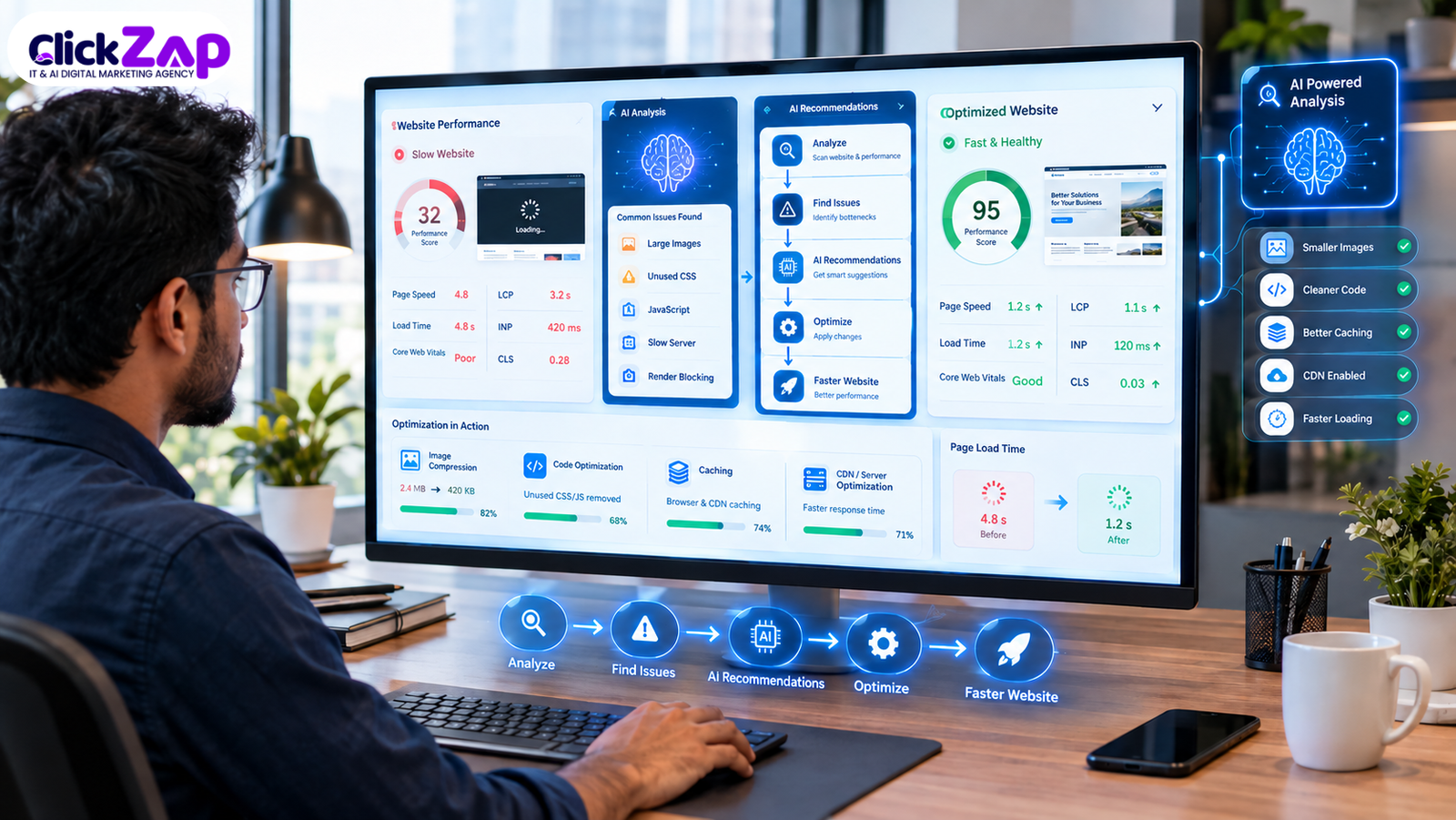
Step 1 : Establish a performance baseline. Check: current Core Web Vitals and load times using Page Speed Insights or Lighthouse. AI can help: summarize the baseline report clearly. Action: record scores for key pages. Validate: confirm the baseline data reflects real conditions, not a one off test.
Step 2 : Collect performance data. Check: server response time, resource sizes, script counts. AI can help: aggregate data across multiple pages into a single summary. Action: export reports from Page Speed Insights, GTMetrix, and Search Console. Validate: cross check data consistency across tools.
Step 3 : Identify bottlenecks. Check: which specific resources or scripts are slowing pages. AI can help: patterns match recurring issues across templates. Action: list the top three to five bottlenecks by page type. Validate: confirm the same issue appears across multiple test runs.
Step 4 : Use AI to interpret the data. Check: technical findings that are hard to parse manually. AI can help: translate audit jargon into plain language explanations and likely causes. Action: ask AI to summarize which issues most affect LCP, INP, and CLS specifically. Validate: sanity check AI explanations against the original report data.
Step 5 : Prioritize issues. Check: estimated impact versus implementation effort for each issue. AI can help: rank issues by likely performance and SEO impact. Action: build a prioritized fix list with owners and deadlines. Validate: confirm the top issues align with business critical pages.
Step 6 : Optimize images. Check: image file sizes, formats, and dimensions. AI can help: flag oversized or inefficient images at scale. Action: compress images, switch to modern formats, and implement lazy loading. Validate: re-test LCP on affected pages.
Step 7 : Optimize JavaScript and CSS. Check: render blocking and unused code. AI can help: highlight scripts most linked to slow INP or delayed rendering. Action: defer non critical scripts, minify code, and extract critical CSS. Validate: re-test INP and confirm no functionality broke.
Step 8 : Improve server response time. Check: time to first byte and hosting performance. AI can help: summarize server log patterns. Action: consider caching, a CDN like Cloudflare, or hosting upgrades. Validate: measure server response time before and after.
Step 9 : Improve mobile website performance. Check: mobile specific load times and layout behavior. AI can help: compare mobile versus desktop performance gaps. Action: prioritize mobile first fixes for the highest traffic pages. Validate: re-test using mobile emulation in Lighthouse.
Step 10 : Validate the changes. Check: whether fixes actually improved the target metrics. AI can help: summarize before and after comparisons. Action: re-run Page Speed Insights and GTMetrix tests. Validate: confirm improvements hold across repeated tests, not just one run.
Step 11 : Monitor performance continuously. Check: ongoing performance trends, not just a single audit. AI can help: flag regressions automatically as they appear. Action: set up recurring monitoring through Search Console and a performance tool of choice. Validate: review monthly trend reports and address regressions promptly.
AI for Image Optimization
Images are frequently the single largest contributor to slow load times. AI can help identify which images are oversized relative to their display dimensions, which pages would benefit most from modern formats, and where lazy loading is missing.
Key practices:
- Compression : Reducing file size without visibly degrading quality.
- Modern formats : Using formats like Web P or AVIF, which typically compress better than older formats.
- Responsive images : Serving different image sizes based on device/screen size.
- Correct dimensions : Matching the image’s actual file dimensions to its displayed size.
- Lazy loading : Deferring offscreen images until a user scrolls near them.
- Reducing unnecessary images : Removing decorative images that add weight without adding value.
AI tools are useful for scanning many pages at once and flagging outliers. For instance, a product page with a 4MB banner image where a 200KB version would look identical to most users. The balance between image quality and performance is a judgment call, and AI recommendations should be reviewed against actual visual quality before publishing.
AI for JavaScript and CSS Optimization
JavaScript and CSS issues are more delicate to fix than images because they can affect site functionality if handled carelessly. AI can help identify:
- Unused JavaScript loaded on pages where it serves no purpose
- Render blocking resources that delay first paint
- Excessive third party scripts
- Opportunities for code splitting, so only necessary code loads per page
- Files that would benefit from minification
- Scripts that could be deferred or loaded asynchronously
- Critical CSS that should be in lined for faster above the fold rendering
Important caution: aggressive JavaScript optimization can break site functionality. A deferred script that a page actually depends on for a form or interactive element can cause visible errors. Every change here should be tested in a staging environment before going live, and rolled back quickly if something breaks.
AI Powered Technical SEO Optimization
Website performance doesn’t exist in isolation from technical SEO; the two overlap significantly. AI can assist SEO professionals in reviewing:
- Crawlability — Whether search engine bots can efficiently access important pages
- Indexability — Whether pages are eligible to appear in search results
- Mobile usability — Whether pages render correctly and remain usable on mobile devices
- Internal linking — Whether important pages receive sufficient internal link equity
- JavaScript rendering — Whether content dependent on JavaScript is visible to crawlers
- Canonicalization — Whether duplicate or near duplicate pages are properly consolidated
- XML sitemaps — Whether sitemaps accurately reflect the site’s indexable pages
- Robots.txt — Whether crawl directives are correctly configured
- Structured data — Whether markup accurately describes page content
- Page experience — How performance, mobile usability, and safe browsing combine into overall experience signals
AI can help by scanning large sitemaps, spotting inconsistent patterns, and summarizing findings for a technical SEO professional to act on but interpreting business context and making final implementation decisions still requires human expertise.
AI Website Performance Optimization vs Traditional Optimization
|
Factor |
Traditional Optimization |
AI Powered Optimization |
|
Data analysis |
Manual review of reports, page by page |
Faster analysis and summarization across many pages at once |
|
Issue detection |
Relies on auditor experience and time available |
Pattern recognition can surface recurring issues faster |
|
Prioritization |
Based on auditor judgment, often inconsistent |
Can rank issues by estimated impact, though still needs human review |
|
Automation |
Largely manual, repeated audits are time intensive |
Supports scheduled monitoring and automated alerts |
|
Monitoring |
Periodic, often reactive |
Continuous, with faster regression detection |
|
Scalability |
Difficult across large sites |
Easier to apply consistent analysis across many pages |
|
Human expertise |
Central to every step |
Still essential for validation, implementation, and business context |
Neither approach eliminates the need for skilled people. AI powered website performance optimization accelerates analysis and prioritization; it doesn’t remove the need for developers, SEO professionals, and business judgment.
How AI Powered Website Performance Optimization Can Increase Conversions
The path from performance to revenue runs through a fairly direct chain:
Performance → UX → Engagement → Trust → Conversion.
- Faster page experiences reduce the chance a visitor leaves before your offer even loads.
- Reduced friction, fewer stalls, smoother scrolling keeps prospects moving toward a form or purchase.
- Better mobile experience matters disproportionately for Indian audiences, where a large share of B2B research and local business discovery happens on mobile.
- Improved landing page experience directly affects PPC quality scores and cost efficiency, not just organic rankings.
- Better interaction responsiveness (good INP) means buttons and forms feel reliable, reducing accidental abandonment.
- Improved user confidence a fast, stable site subtly signals professionalism and trustworthiness before a single word is read.
Example: a B2B SaaS landing page with a 5 second load time and a shifting layout may see visitors abandon before the demo request form is even visible. Tightening LCP and eliminating layout shifts on that same page can meaningfully improve the odds a visitor completes the form without changing a single word of copy.
Common Website Performance Problems AI Can Help Identify
- Slow server response time
- Large, unoptimized images
- Excessive or unnecessary JavaScript
- Render blocking resources
- Third party scripts adding unnecessary weight
- Poor mobile performance
- Unexpected layout shifts
- Slow LCP on key landing pages
- Poor INP on interactive elements
- Caching misconfigurations
- Unoptimized or duplicate resources
- Underlying technical SEO issues affecting crawl and index efficiency
Limitations of AI Powered Website Optimization
AI is a powerful accelerant, not an infallible fix. A trustworthy approach to AI powered website performance optimization means being upfront about what AI cannot do:
- AI recommendations can be inaccurate or based on incomplete context.
- AI does not understand every business constraint. A “slow” third party script might be a critical payment gateway that can’t simply be removed.
- Developers often still need to implement the actual code or infrastructure changes.
- Performance improvements require testing before and after deployment AI can’t guarantee a fix works until it’s validated.
- Some issues require server level or hosting level access that AI tools cannot reach directly.
- AI generated code suggestions can introduce bugs if applied without review.
- Human validation remains essential at every stage, from diagnosis to final deployment.
- SEO and performance recommendations from AI should be verified against current official documentation before implementation.
This is precisely why AI powered website performance optimization works best as a collaboration between AI assisted analysis and experienced human oversight not as an unsupervised, fully automated process.
Best Practices for AI Powered Website Performance Optimization
- Measure before optimizing, never guess at what’s slow.
- Prioritize high impact issues over easy but minor fixes.
- Focus on real user experience, not just lab test scores.
- Optimize mobile performance as a first class priority.
- Monitor Core Web Vitals on an ongoing basis, not just once.
- Compress and properly size all images.
- Reduce unnecessary JavaScript wherever possible.
- Improve server response time through hosting or caching upgrades.
- Use caching and CDN strategies where appropriate for your traffic pattern.
- Test every change in staging before deployment.
- Continuously monitor performance rather than treating optimization as a one-time project.
- Combine AI assistance with human expertise at every stage of the process.
AI Website Performance Optimization Checklist
☐ Check page speed
☐ Analyze Core Web Vitals
☐ Check LCP
☐ Check INP
☐ Check CLS
☐ Analyze server response time
☐ Optimize images
☐ Review JavaScript
☐ Review third party scripts
☐ Check mobile performance
☐ Review technical SEO
☐ Validate changes
☐ Monitor performance continuously
Frequently Asked Questions
What is AI powered website performance optimization?
It’s the use of artificial intelligence to analyze website speed data, detect bottlenecks like slow LCP or poor INP, and recommend or help automate fixes. It speeds up diagnosis and prioritization, but implementation still typically requires a developer or SEO professional to execute and validate the changes.
How does AI improve website speed?
AI improves website speed by analyzing performance data faster than manual review, spotting recurring issues across many pages, and prioritizing fixes by likely impact. It can flag oversized images, render blocking scripts, and slow server responses, giving teams a clear starting point instead of a raw, unprioritized audit report.
Can AI optimize Core Web Vitals?
AI can help identify what’s causing poor LCP, INP, or CLS scores by analyzing which resources or scripts are contributing most to each metric. However, AI doesn’t directly “optimize” Core Web Vitals; the actual fixes, like compressing images or deferring scripts, still require implementation and testing by a developer.
Does website speed affect SEO?
Yes. Google factors page experience signals, including Core Web Vitals, into how pages are evaluated for search. Beyond direct ranking signals, slow pages also see higher bounce rates and lower engagement, which can indirectly affect how a site performs in search over time.
What are the best tools for website performance analysis?
Google Page Speed Insights and Lighthouse are strong starting points for lab and field data. GTMetrix adds detailed waterfall reports, Google Search Console shows real world Core Web Vitals at scale, and Cloudflare helps address infrastructure level speed issues through caching and CDN delivery.
Conclusion
AI powered website performance optimization isn’t a shortcut that replaces technical expertise, it’s a way to compress the time between spotting a problem and understanding what to do about it. By combining AI assisted analysis with disciplined, human validated implementation, businesses can address Core Web Vitals issues, tighten technical SEO, and remove friction that quietly costs conversions every day.
The businesses that benefit most treat performance as an ongoing discipline: measure, prioritize, fix, validate, and monitor repeatedly, not once. If your website is struggling with slow load times, inconsistent Core Web Vitals scores, or technical SEO issues that are hard to diagnose in house, ClickZap IT’s team can help you build a structured, AI assisted optimization plan tailored to your site and business goals. Get in touch with ClickZap IT to discuss where your website’s performance stands today.
Also Read : How AI Marketing Funnel Optimization Services Can Increase Your Conversions

0 Comments