
You just launched a website. You hit “publish” on a brilliant article. Then you search for it on Google… and it’s on page 17. Nobody is going to page 17.
In 2026, ranking on Google isn’t about tricking the algorithm. It is about proving you have the best answer. Whether you run a local bakery or a tech startup, mastering SEO basics for beginners is the single highest ROI activity you can do.
This guide isn’t just theory. We are going to use Generative Engine Optimization (GEO) so AI tools cite you, Answer Engine Optimization (AEO) so you win voice search, and Search Experience Optimization (SXO) so users never bounce.
By the end of this post, you will have a roadmap to dominate Google in 2026.
SEO Basics for Beginners: Understanding the 2026 Landscape
Before we touch a single setting, you need to understand how search has changed. In 2026, Google is an AI-first answers engine. It doesn’t just rank web pages; it ranks entities (people, places, things) and user intent.
The 3 Pillars of 2026 SEO:
- E-E-A-T (Experience, Expertise, Authoritativeness, Trustworthiness): Google needs proof you know what you’re talking about (first-hand experience).
- Core Web Vitals: Your site must be fast, stable, and interactive.
- Semantic Search: Google understands context, not just keywords. You need LSI keywords and topical authority.
Keyword Research Using Intent

Most beginners pick the wrong keywords. They target “how to lose weight” (too hard) or “buy blue shoes” (too specific without traffic).
How to find gold (Step-by-step):
- Brainstorm “Seed” keywords: What 5 things does your business solve?
- Use free tools:
- Google Autocomplete: Type “How to…” and see what drops down.
- AlsoAsked.com: Visualizes questions people ask.
- AnswerThePublic: Great for long-tail variations.
- Check competition: Type your keyword into Google. If Amazon, Wikipedia, or Forbes own the top 3 spots, pick a longer tail (e.g., “best running shoes for flat feet beginners”).
SEO Basics for Beginners: Technical SEO Checklist
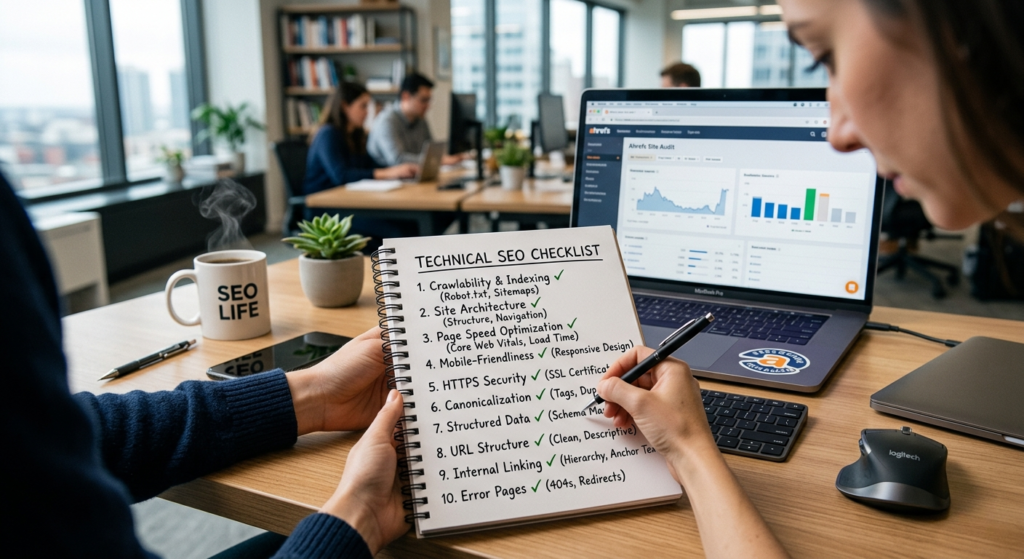
If Google cannot crawl your site, you cannot rank. This is the boring stuff that wins the race.
Your 2026 Technical SEO Checklist:
| Task | Why it matters | Tool to use |
| Indexing | Ensure Google knows you exist. | Google Search Console |
| SSL Certificate | HTTPS is a ranking signal. (No “Not Secure” warnings). | Your hosting provider |
| Mobile-Friendly | 80% of searches happen on phones. | Google Mobile-Friendly Test |
| Page Speed | If it takes >2.5 seconds to load, 50% of users leave. | PageSpeed Insights |
| XML Sitemap | The roadmap for Google bots. | Yoast SEO or Rank Math |
| Robots.txt | Tell bots which pages to ignore (e.g., thank you pages). | Manual (via WordPress) |
Core Web Vitals (CWV) in 60 seconds:
Google measures three things:
- LCP (Largest Contentful Paint): Main content loads fast (< 2.5s).
- FID (First Input Delay): Buttons react fast (< 100ms).
- CLS (Cumulative Layout Shift): Elements don’t jump around while loading.
Fix: Switch to a fast hosting (Kinsta, WP Engine) and optimize images (WebP format).
SEO Basics for Beginners: On-Page SEO Techniques
On-page SEO is everything on the website you control. If you master only one chapter, make it this one.
The Perfectly Optimized Page (Template)
- The URL (SEO-Friendly URLs)
- ❌ website.com/p=123
- ✅ website.com/seo-basics-for-beginners
- The Title Tag (H1)
- Must include your primary keyword (SEO basics for beginners).
- Keep under 60 characters.
- Example: SEO Basics for Beginners: A 2026 Step-by-Step Guide
- The Meta Description
- Not a direct ranking factor, but clicks are. Write a sales pitch.
- Example: “New to SEO? Learn the exact on-page, off-page, and technical SEO strategies to rank #1 on Google in 2026. Free checklist included.”
- Headings (H2/H3)
- Break up text. Use your secondary keywords naturally (e.g., On-Page SEO Techniques).
- The First 100 Words
- Immediately state the problem and use your primary keyword.
- Example: “Learning SEO basics for beginners can feel overwhelming, but it doesn’t have to be…”
- Content Optimization Strategy
- Bolded text: Helps Google understand importance.
- Images: Use Alt Text (describe the image using keywords).
- Internal linking: Link to your own other relevant pages.
SEO Basics for Beginners: Content Writing Tips for 2026
Google’s algorithm is now a large language model (like ChatGPT). It ranks helpfulness above all.
How to write for “Organic Traffic Growth”:
- Write for “Skimmers”: Use bullet points, bold text, and tables. If the user bounces back to Google (a “pogo stick”), your ranking drops.
- Answer the question immediately: Do not write a 500-word story about your cat before telling them how to bake a cake.
- Semantic richness: Use related terms like crawlability, indexing, and SERP features naturally.
- Original data: Google loves unique case studies. Even a survey of 100 people is better than generic advice.
SEO Basics for Beginners: Off-Page SEO & Link Building
Off-page SEO is what others say about you. The #1 ranking factor is still high-quality backlinks (other websites linking to you).
Link Building Strategies 2026 (That actually work)
Forget: Buying links, comment spam, or directory submissions (These get you penalized).
Do this instead:
- The “Skyscraper” Technique: Find a popular post in your niche. Write a better version (more recent, more detailed, better design). Email everyone who linked to the old one and say “Check out my updated resource.”
- Digital PR: Create a statistic or study. Example: “We analyzed 1 million Google results. Here is the exact word count for #1 rankings.” Journalists love data.
- Guestographics: Offer to write a “Guest Post” but instead of text, you offer an infographic. They get free content; you get a backlink.
- Unlinked Mentions: Use Ahrefs or SEMrush to find websites that mentioned your brand but didn’t link to you. Ask them to add a link.
SEO Basics for Beginners: Local SEO Strategy
If you have a physical store or serve a specific city, Local SEO is your goldmine.
The “Near Me” Optimization Checklist:
- Google Business Profile (GBP): Claim it. Fill out every field (hours, photos, services, attributes like “women-owned”).
- NAP Consistency: Your Name, Address, Phone number must be identical on your website, Yelp, Facebook, and BBB.
- Local Reviews: Respond to every review (even bad ones). Use keywords in your responses (“Thanks for loving our organic coffee in Austin“).
- Local Content: Write blog posts about local events (“Our guide to the Downtown Summer Festival”).
Essential SEO Tools for Beginners
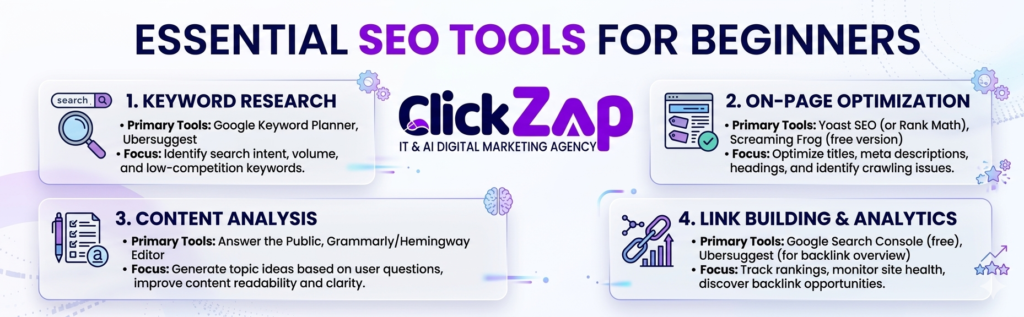
You don’t need a $1,000/month budget. Here is the SEO tools for beginners starter pack:
| Tool | Best For | Free Tier? |
| Google Search Console | Indexing, clicks, Core Web Vitals | Yes (Essential) |
| Google Analytics (GA4) | User behavior, traffic sources | Yes |
| Rank Math / Yoast SEO | WordPress on-page optimization | Yes (Freemium) |
| Ubersuggest | Keyword research & competitor analysis | Yes (Limited) |
| Ahrefs Webmaster Tools | Backlink analysis & technical audits | Yes (Limited) |
| PageSpeed Insights | Speed optimization | Yes |
Generative Engine Optimization (GEO)
By 2026, Google’s SERP (Search Engine Results Page) often shows an “AI Overview” at the top. This is a paragraph written by Google AI summarizing the answer. If you aren’t cited here, you lose 50% of your traffic.
How to get cited by Google’s AI (GEO Strategy):
- Use “Prompt Clusters”: Write a section that answers a specific query like “Explain [topic] to a beginner” or “Compare X vs Y”.
- Cite your sources internally: Link to your own scientific studies or data sheets.
- Use clear definitions: Write “Domain Authority (DA) is a score from 0 to 100 that predicts ranking ability.”
- Structured lists: AI prefers numbered steps and bullet points over dense paragraphs.
Conclusion:
You don’t need to do everything at once. Follow this 30-day roadmap to master SEO basics for beginners.
Week 1: Foundation
- Install Google Search Console & Google Analytics.
- Run a speed test on PageSpeed Insights. Fix the top 3 errors.
- Claim your Google Business Profile (if local).
Week 2: Content & Keywords
- Find 10 long-tail keywords using Ubersuggest.
- Write 1 “Cornerstone” article (2000+ words) covering one topic deeply.
- Optimize your Title, H1, URL, and Meta Description for your primary keyword.
Week 3: On-Page Polish
- Add internal links (link your new article to 3 old articles).
- Compress all images (TinyPNG) and add Alt Text.
- Ensure your site is mobile-friendly (tap buttons, readable text).
Week 4: Off-Page Action
- Send 10 “Skyscraper” emails to websites linking to outdated resources.
- Ask 5 customers for a Google review (if local).
- Share your post on LinkedIn / Twitter.
FAQs
Q1: What are the SEO basics for beginners in 2026?
A: The basics are: (1) Find what people search for (Keyword research), (2) Make your site fast (Technical SEO), (3) Write helpful answers (On-page SEO), and (4) Get others to link to you (Off-page SEO).
Q2: How can I improve my website ranking fast?
A: Fastest wins: Fix your page speed (compress images), update old content with current dates, and build 3-5 high-quality backlinks from relevant blogs. Results usually take 4-8 weeks.
Q3: Do I need to pay for SEO tools as a beginner?
A: No. Google Search Console and Google Analytics are free and cover 80% of your needs. Use free versions of Ubersuggest or Ahrefs Webmaster Tools for keyword research.
Q4: What is the difference between on-page and off-page SEO?
A: On-page SEO is what you do on your site (keywords, headings, speed). Off-page SEO is what others do (backlinks, social shares, reviews). You need both to rank #1.
Q5: How does Google rank content using E-E-A-T?
A: Experience (Did you actually use the product?), Expertise (Do you have credentials?), Authoritativeness (Do other experts cite you?), Trustworthiness (Is your site secure and honest?).
Q6: Is WordPress good for SEO?
A: Yes, WordPress is excellent because it allows full control over SEO-friendly URLs, meta tags, and schema markup. Use plugins like Rank Math or Yoast SEO.
Q7: What are Core Web Vitals and why do they matter?
A: Core Web Vitals are Google’s speed metrics (LCP, FID, CLS). They matter because if your site is slow or jumpy, Google demotes your ranking on mobile search.
Q8: Can AI write my SEO content?
A: AI can write drafts and outlines, but you must add personal experience, case studies, and original data. Google rewards “human helpfulness,” not pure AI generation.



0 Comments