
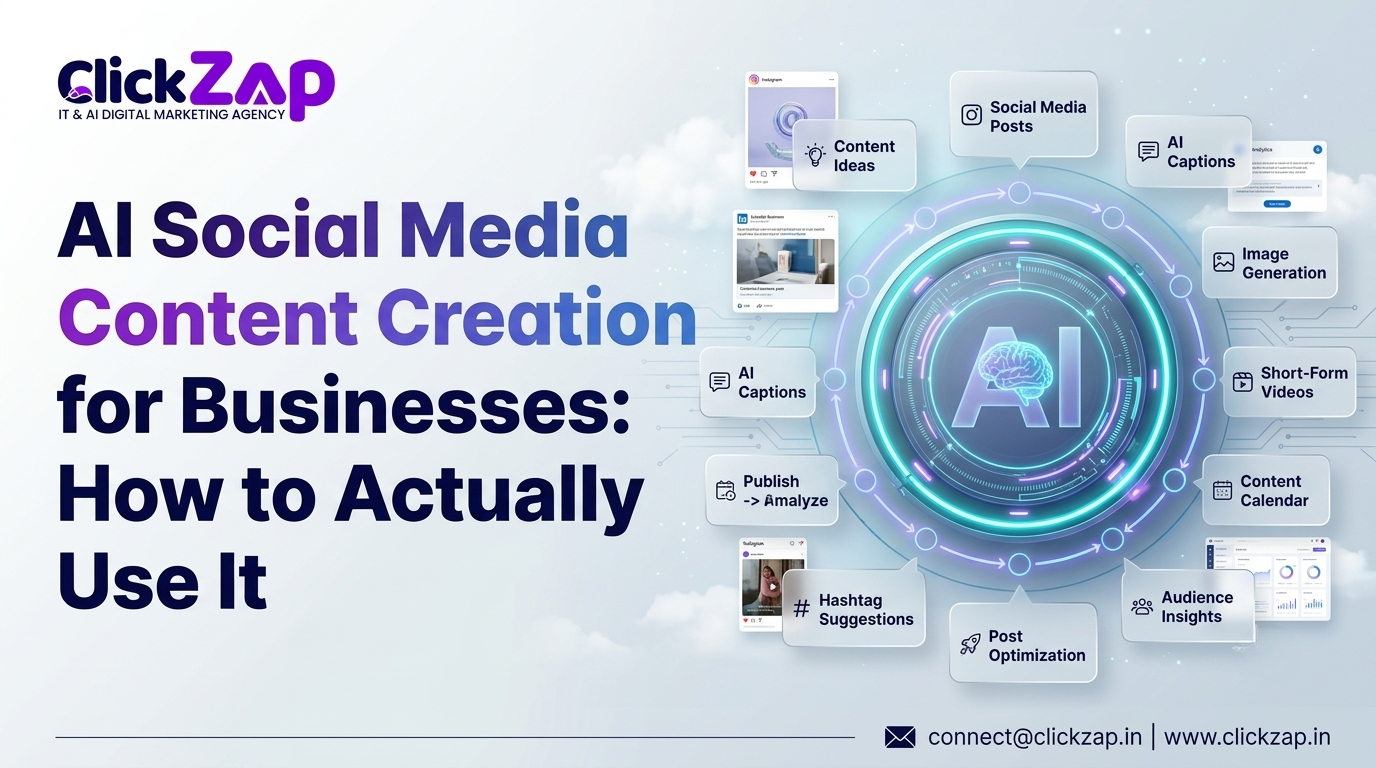
AI Social Media Content Creation for Businesses
Every business owner knows the feeling. It’s Tuesday, the content calendar is empty, and three platforms are waiting for something to post. Coming up with fresh ideas week after week is exhausting, and most small teams don’t have the bandwidth to do it well. This is where AI social media content creation for businesses has become a genuinely useful shift, not just another buzzword. AI won’t replace your marketing instincts, but it can take over the repetitive parts of content production so your team spends less time staring at a blank screen and more time on strategy and relationships with your audience.
In this guide, you’ll learn what AI social media content creation actually means, how to build a practical workflow around it, which tools are worth your time in 2026, and how to keep your brand voice intact while using AI as an assistant rather than a replacement.
What Is AI Social Media Content Creation for Businesses?

AI social media content creation for businesses refers to using artificial intelligence tools to help plan, write, design, and manage social media content while a human still directs the strategy and approves what gets published.
In practice, this can include:
- Generating content ideas based on your industry and audience
- Writing first draft captions for Instagram, LinkedIn, or Facebook
- Creating or assisting with graphics and short form video concepts
- Suggesting relevant hashtags
- Building out a content calendar
- Repurposing one piece of content into several formats
- Scheduling posts across platforms
- Analyzing performance data to guide future content
The key word is “assist.” AI is best used as a productivity layer on top of your marketing strategy, not as a replacement for the judgment that makes content actually resonate with real customers.
Why Businesses Are Using AI for Social Media Marketing

The appeal isn’t complicated: AI saves time and reduces the friction of staying consistent. Here’s where it makes the biggest difference.
Faster Content Production
A task that used to take an hour drafting five caption variations for a product launch can now take ten minutes. That’s not an exaggeration of capability, it’s simply what happens when you remove the blank page problem from the process.
More Consistent Publishing
Consistency is one of the hardest parts of social media, especially for businesses without a dedicated content team. AI assisted drafting and content calendar automation make it realistic to maintain a steady posting schedule instead of going quiet for weeks at a time.
Better Content Ideation
AI powered content ideation is useful when a team runs out of fresh angles. Feeding AI details about your industry, audience, and recent trends can produce dozens of usable starting points in minutes, most of which still need human refinement, but that’s far faster than starting from zero.
Easier Content Repurposing
One blog post, case study, or webinar can become a week’s worth of social posts. AI speeds up the repurposing work of adapting long form content into shorter, platform specific formats.
Improved Brand Voice Consistency
When AI tools are given clear brand voice guidelines, they can help keep tone and vocabulary consistent across multiple team members creating content something that’s normally hard to manage manually.
More Efficient Social Media Management
Using AI for social media management extends beyond writing. AI can help organize your calendar, suggest optimal posting times, and flag underperforming content patterns.
Better Engagement Rate Optimization
AI tools that analyze past post performance can highlight what formats, topics, or posting times tend to drive better engagement, giving you data informed direction instead of guesswork.
How to Use AI for Social Media Posts
Here’s a practical, step by step workflow any business can adapt.
Step 1: Define Your Audience
Before generating anything, tell the AI tool who you’re writing for their industry, pain points, and what they care about. The more specific this input is, the less generic the output will be.
Step 2: Define Your Brand Voice
Give the AI tool a short brand voice brief covering:
- Tone
- Vocabulary to use or avoid
- Brand personality traits
- A few examples of past posts that represent your voice well
- Any content rules
Step 3: Generate Content Ideas
Ask for a batch of ideas tied to a theme, product, or season. Treat these as a starting list to filter, not a final plan.
Step 4: Create Captions
Caption writing with AI works best when you give it a specific goal for the post: educate, promote, entertain, or build community rather than a vague prompt like “write a caption about our brand.”
Step 5: Generate Visual Concepts
AI and design platforms can suggest layout ideas, color directions, or draft graphics that a designer can refine, saving time on the earliest, roughest part of the design process.
Step 6: Generate Hashtag Ideas
AI hashtag generation should prioritize relevance over volume. A handful of hashtags your actual audience searches or follows will always outperform a long list of generic ones.
Step 7: Review and Edit
This step is non-negotiable. AI generated drafts often need adjustments for accuracy, tone, and specificity. A human review pass is what turns an AI draft into something worth publishing under your brand name.
Step 8: Schedule and Publish
Social media scheduling tools with AI features can suggest optimal timing and queue posts across platforms, reducing manual publishing work.
Step 9: Analyze Performance
Review engagement data regularly and feed those insights back into your next round of content ideation.
How AI Can Fit Into a Business Social Media Content Workflow
A simple way to visualize this is as a chain:
Research → Ideation → Content Brief → Caption → Visual → Review → Scheduling → Publishing → Analytics → Optimization
AI can assist heavily at the research, ideation, caption, and analytics stages. Human involvement matters most at the brief, review, and final publishing decision stages, the points where brand judgment and accountability matter.
AI Social Media Strategy for Small Businesses

You don’t need a big budget or a large team to build an effective AI social media strategy for small businesses. Here’s how it can look across different industries:
- Local businesses: Use AI to draft promotional posts for weekly specials and repurpose customer reviews into social proof content.
- Restaurants: Generate captions for daily specials and seasonal menu items, paired with photos taken in house.
- Real estate: Turn listing descriptions into multi platform posts and short video scripts for walkthroughs.
- E-commerce brands: Repurpose product descriptions into carousel posts and generate promotional copy for sales events.
- Professional services: Use AI to draft educational posts that explain services in plain language for a non expert audience.
- B2B companies: Turn case studies, whitepapers, and webinars into LinkedIn ready posts.
- Startups: Use AI to maintain a consistent posting cadence while the founding team focuses on product and sales.
An AI content strategy for businesses works best when AI handles the repetitive drafting work while your team keeps ownership of the ideas that actually reflect your brand and customers.
Best AI Social Media Tools for Businesses in 2026
| Tool | Best For | Key Use | Suitable For |
| ChatGPT | Idea generation, captions, calendars | Conversational content drafting | Most businesses, all sizes |
| Canva Magic Studio | Visual content | AI assisted graphic design | Teams without a designer |
| Jasper AI | Brand voice content at scale | On brand copywriting | Marketing teams with defined brand guidelines |
| Copy.ai | Quick copy variations | Caption and ad copy generation | Small teams needing speed |
| Semrush Content Shake AI | SEO informed content | Content ideas tied to search data | Businesses focused on organic growth |
| Hootsuite AI | Scheduling and calendar management | AI assisted publishing workflow | Teams managing multiple platforms |
| Buffer AI Assistant | Caption drafting and scheduling | Lightweight all in one workflow | Small businesses and solopreneurs |
| Adcreative.ai | Ad creative generation | AI generated ad visuals and copy | Businesses running paid social campaigns |
Each tool has trade offs. ChatGPT is flexible but needs clear prompting to avoid generic output. Canva Magic Studio is strong for visuals but isn’t built for long-form strategy work. Jasper AI performs well once brand voice settings are configured, but takes setup time. Scheduling focused tools like Hootsuite and Buffer are convenient but shouldn’t be relied on for high quality writing without editing.
Social Media Marketing Services
ChatGPT for Social Media: Practical Use Cases
ChatGPT for social media is one of the most accessible entry points for businesses experimenting with AI content creation. Practical uses include:
- Drafting Instagram captions in different tones for the same photo
- Writing LinkedIn content that explains a business update in plain language
- Turning a blog post into five Facebook post variations
- Creating a week’s worth of content calendar ideas around a theme
- Building simple customer persona summaries to guide messaging
- Writing content briefs for a designer or copywriter
- Drafting A/B caption variations to test engagement
Example prompts you can adapt:
- “Write three LinkedIn post variations announcing, each with a different opening line.”
- “Turn this blog summary into an Instagram carousel outline with 6 slides.”
- “Suggest 10 content ideas for a business targeting this month.”
How to Maintain Brand Voice When Using AI
AI generated content can sound generic when it’s given vague instructions. The fix is a clear brand voice framework:
Brand Personality + Audience + Tone + Vocabulary + Examples + Content Rules + Human Editing
Feed the AI tool actual examples of posts that sound like your brand, along with words or phrases to avoid. Then treat every AI draft as a starting point that still needs a human editing pass to sound like your business instead of a template.
AI-Generated Social Media Content vs Human-Created Content
| Factor | AI Generated Content | Human Created Content |
| Speed | Fast | Slower |
| Creativity | Good for variations, weaker on original ideas | Stronger for original creative direction |
| Brand authenticity | Needs guidance to stay on-brand | Naturally authentic |
| Personalization | Limited without detailed input | Strong |
| Consistency | High once set up | Depends on team bandwidth |
| Scalability | High | Limited by team size |
| Accuracy | Requires fact checking | Depends on the writer’s knowledge |
| Emotional connection | Weaker | Stronger |
The takeaway: the strongest approach is usually AI assisted content creation, not blindly publishing AI generated content without review.
Social Media Automation With AI: What Should You Automate?
Good tasks to automate:
- Content scheduling
- Content calendar organization
- First draft captions
- Content repurposing
- Idea generation
- Basic performance reporting
- Routine, low risk workflows
Tasks that should have human oversight:
- Brand sensitive communication
- Crisis responses
- Customer complaints
- Controversial topics
- Major announcements
- Personal stories
- Final publishing decisions
The reasoning is simple: automation works well for repetitive, low stakes tasks. Anything that touches customer trust or brand reputation needs a human making the final call.
Content Repurposing With AI
One piece of content can become several social assets:
One Blog Post → LinkedIn Post → Instagram Carousel → Facebook Post → X Post → Short Video Script → Email Newsletter
AI can accelerate this process by drafting each format quickly, but someone on your team should confirm the core message stays accurate and consistent across every version.
How to Create an AI Powered Social Media Content Calendar
A simple weekly structure might look like this:
- Monday: Educational post
- Tuesday: Behind the scenes content
- Wednesday: Promotional post
- Thursday: Customer focused content or testimonial
- Friday: Engagement post
- Saturday: Thought leadership or industry insight
- Sunday: Light or community focused content
Content calendar automation reduces the repetitive planning work of deciding what to post each day, letting your team focus on refining the ideas rather than generating the schedule from scratch every week.
Common Mistakes Businesses Make When Using AI for Social Media
| Mistake | Solution |
| Publishing AI content without editing | Always review before posting |
| Using generic prompts | Give specific audience and brand context |
| Ignoring brand voice | Set up a brand voice brief for the AI tool |
| Over automating engagement | Keep replies and community management human-led |
| Creating repetitive content | Vary formats and angles regularly |
| Using irrelevant hashtags | Prioritize relevance over volume |
| Focusing only on quantity | Prioritize quality and relevance over post count |
| Not checking facts | Verify any claims or data before publishing |
| Ignoring audience feedback | Monitor comments and adjust content direction |
| Not analyzing performance | Review analytics regularly to guide strategy |
How to Measure the Success of AI Powered Social Media Content
Relevant KPIs include engagement rate, reach, impressions, saves, shares, comments, click-through rate, website traffic, leads, conversions, and cost per lead where applicable.
AI-powered content should be evaluated based on business outcomes, leads, traffic, and conversions, not simply the number of posts produced. More content isn’t the goal; better performing content is.
A Practical AI Social Media Content Creation Process for Businesses
- Research — Understand your audience and current trends
- Plan — Build a content calendar around themes and goals
- Generate — Use AI to draft ideas, captions, and visuals
- Edit — Review for accuracy, tone, and brand fit
- Design — Finalize graphics or video assets
- Schedule — Queue content using scheduling tools
- Publish — Post according to your calendar
- Measure — Track engagement and business outcomes
- Improve — Feed performance data back into future ideation
Example AI Social Media Workflow for a Small Business
- Monday: Educational Instagram post AI drafts caption, human edits and adds photo Objective: build authority
- Tuesday: LinkedIn post repurposed from a blog article AI drafts summary Objective: drive website traffic
- Wednesday: Promotional Facebook post AI drafts copy, human adds offer details Objective: drive sales
- Thursday: Customer testimonial post Human writes, AI suggests formatting Objective: build trust
- Friday: Instagram poll or question sticker AI suggests question ideas Objective: boost engagement
- Saturday: Industry insight post on LinkedIn AI drafts outline, human adds expertise Objective: thought leadership
- Sunday: Light, community focused post AI suggests a caption, human finalizes Objective: humanize the brand
Is AI Going to Replace Social Media Managers?
No. AI can automate repetitive tasks like drafting and scheduling, but social media still requires strategy, creativity, brand understanding, community management, emotional intelligence, and business context that AI cannot replicate on its own.
Social media managers who use AI well typically produce more content, faster, while spending more time on strategy, community engagement, and creative direction, the parts of the job that actually require a human.
Future of AI Social Media Marketing Tools in 2026 and Beyond
Expect continued progress in areas like more advanced personalization, AI assisted video creation, smarter content repurposing, predictive analytics, improved social listening, and more integrated content workflows that connect ideation, creation, and scheduling in a single system. These are reasonable directions based on current trends, not guaranteed outcomes.
Conclusion
AI social media content creation for businesses isn’t about producing more posts for the sake of volume. It’s about using AI to generate better ideas, speed up production, stay consistent, repurpose content efficiently, automate the repetitive parts of the workflow, and free up your marketing team to focus on strategy and real relationships with your audience.
The businesses that get the most value from AI are the ones that treat it as an assistant, not an autopilot reviewing every draft, protecting their brand voice, and keeping humans in charge of the decisions that matter.
If you’d rather have a team handle this for you, ClickZap IT works with businesses across Hyderabad and beyond on social media marketing, content marketing, SEO, and AI powered marketing solutions built around your brand and your goals.
FAQ
What is AI social media content creation for businesses?
It’s the use of AI tools to help plan, write, design, and manage social media content, while humans direct strategy and approve what gets published. AI assists with ideas, captions, visuals, hashtags, and scheduling.
How can businesses use AI to create social media content?
Businesses can use AI for content ideation, caption writing, hashtag suggestions, content calendars, and repurposing existing content into new formats always followed by human review before publishing.
How can small businesses use AI for social media marketing?
Small businesses can use AI to draft captions, generate content ideas, and organize a content calendar with limited time and staff, while keeping final review and publishing decisions in human hands.
Is AI generated social media content effective?
It can be effective when used as a starting point that’s reviewed and refined by a human. Publishing AI content without editing often produces generic results that underperform.
What are the best AI social media tools for businesses in 2026?
Commonly used tools include ChatGPT, Canva Magic Studio, Jasper AI, Copy.ai, Semrush Content Shake AI, Hootsuite AI, Buffer AI Assistant, and Adcreative.ai, each suited to different parts of the content workflow.
0 Comments